Last updated: October 2026
Backtesting is an essential step in refining any trading approach. By backtesting a trading strategy, traders can assess how it would have performed on historical data before risking real capital. Backtesting can be performed manually by reviewing historical charts or automatically using tools such as the Strategy Tester in MetaTrader 4 and MetaTrader 5. While automated testing is popular, manual backtesting provides a deeper understanding of market conditions, price action, and decision-making processes. This guide will walk you through the process of backtesting a trading strategy on MT4 and MT5, highlight common mistakes, and ensure you get the most accurate results.
Key Takeaways:
- Backtesting helps traders evaluate how a strategy would have performed under historical market conditions.
- MT4 and MT5 can be used for manual chart-based testing, while their Strategy Tester allows automated strategies and Expert Advisors to be tested on historical data.
- Avoid common mistakes such as overfitting, ignoring spread and commissions, and relying on biased sample sizes.
What is Backtesting in Trading?
Backtesting is the process of evaluating a trading strategy using historical data to determine its potential effectiveness. By replaying past market conditions, traders can see how their strategy would have performed over time. Backtesting can be performed manually by reviewing historical charts and recording hypothetical trades, or automatically by running an Expert Advisor through historical data in the MetaTrader Strategy Tester.
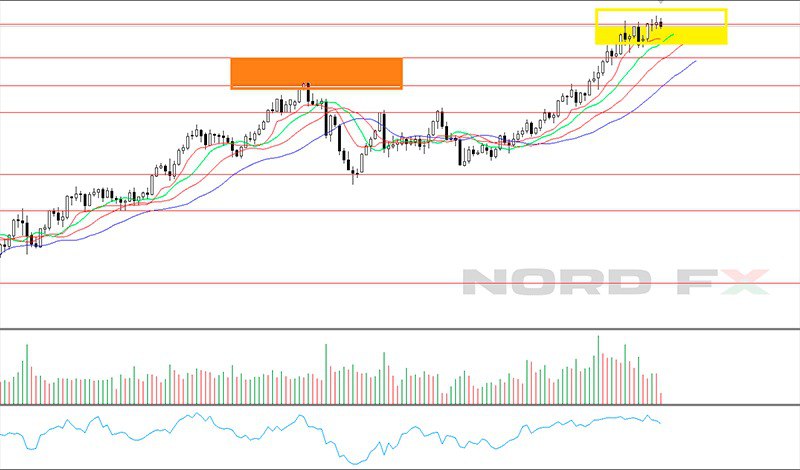
Why Should You Manually Backtest a Trading Strategy?
While many traders rely on automated backtesting, manual backtesting offers several advantages:
✔️ Better understanding of price action – You gain insights into market behavior, trends, and reversals.
✔️ Improved trading discipline – You develop a systematic approach by following your strategy’s rules.
✔️ Greater flexibility – Manual backtesting can be useful for strategies that involve discretionary chart analysis or pattern recognition.
Step-by-Step Guide to Backtest a Trading Strategy on MT4 & MT5
Step 1: Define Your Trading Strategy
Before backtesting, you need a well-defined strategy. This includes:
- Trading setup – Entry and exit conditions (e.g., moving average crossovers, price action patterns).
- Timeframe – Choose the timeframe that best suits your strategy (e.g., 15M, 1H, Daily).
- Risk Management – Define stop-loss, take-profit levels, and position sizing.
Step 2: Prepare Historical Data in MT4 or MT5
Make sure sufficient historical data is available for the instrument and timeframe you want to test. For manual testing, open the relevant chart and navigate to an earlier period. For automated strategies, open the Strategy Tester and select the Expert Advisor, instrument, timeframe and testing period.
- Open MT4/MT5 and go to the "View" menu.
- Open the Strategy Tester if you want to test an Expert Advisor or use visual testing. For manual backtesting, open the relevant historical chart and navigate to the period you want to analyse.
- Load historical data for the asset and timeframe you wish to test.
Step 3: Manually Scroll Through the Chart
- Disable the "Auto Scroll" function to prevent the chart from jumping forward.
- Move back in time and analyze the market as if you were trading live.
- Identify trade setups according to your strategy.
Step 4: Record Your Trades
Each time you identify a trade setup, log the following details:
✔️ Entry price & time
✔️ Stop-loss & take-profit levels
✔️ Trade outcome (win/loss and size of gain/loss)
Use a spreadsheet to track these results.
Step 5: Analyze Results & Adjust
- Calculate the win rate, risk-reward ratio, and drawdowns.
- Identify weaknesses – Are stop-losses too tight? Are winning trades cutting profits too soon?
- Adjust and refine the strategy if needed.
Automated Backtesting with the MT5 Strategy Tester
MT5 also includes a built-in Strategy Tester for testing Expert Advisors on historical data. Traders can select an EA, instrument, timeframe, testing period and modelling method, then analyse how the strategy would have performed under the selected conditions.
MT5 offers several testing modes, including Every tick based on real ticks, Every tick, 1 minute OHLC and Open prices only. More detailed modes generally provide greater realism but require more processing time.
The Strategy Tester also supports visual testing, parameter optimisation and forward testing. Forward testing can be particularly useful for checking whether optimised parameters continue to perform on a separate historical period rather than only on the data used for optimisation.
Backtest results should still be treated with caution. Historical data quality, spreads, commissions, swaps, execution conditions and parameter optimisation can all affect results, while past performance cannot guarantee future performance.
Common Mistakes to Avoid in Manual Backtesting
Ignoring Market Conditions
A strategy that works in a trending market might fail in ranging conditions. Consider different market phases when backtesting.
Overfitting the Strategy
Tweaking a strategy too much based on past data can make it ineffective in live trading. Ensure your rules are logical and adaptable.
Neglecting Transaction Costs
Spreads, commissions, swaps, slippage and execution conditions can affect real trading results. Where relevant, account for these costs and conditions when evaluating a strategy.
Using Too Small a Sample Size
Testing on just a few trades or one market period is unreliable. Use a sufficiently large sample of trades across different market conditions. While 100 trades is sometimes used as a practical reference point, the appropriate sample size depends on the strategy, trading frequency and market being tested.
Emotional Bias
Since manual backtesting is subjective, traders may unconsciously ignore losing trades. Stick to objective criteria for every decision.
Conclusion
Manual backtesting in MT4 and MT5 is an invaluable tool for traders looking to refine their strategies before entering the live market. While time-consuming, it offers deeper insights into market behavior, improves discipline, and helps traders gain confidence. By following this structured step-by-step approach and avoiding common mistakes, traders can increase their chances of long-term success.
Frequently Asked Questions (FAQ)
1. How long should I backtest a trading strategy?
It depends on the strategy, its trading frequency and the market being tested. The test should include a sufficiently large number of trades and, where possible, different market conditions rather than relying on a fixed number of trades or a specific period.
2. Can I backtest on a demo account instead?
Yes, forward testing on a demo account is also useful, but backtesting provides quicker insights into past performance.
3. How do I know if my strategy is profitable?
Review metrics such as net result, win rate, average profit and loss, profit factor and maximum drawdown. Positive historical results may indicate that a strategy performed well during the tested period, but they do not guarantee future profitability.
4. Should I only backtest forex strategies?
No, you can backtest strategies for stocks, commodities, and crypto as long as historical data is available on MT4 or MT5.
5. Is backtesting 100% reliable?
No. Market conditions change, and past performance doesn’t guarantee future results. Backtesting can help traders understand a strategy's historical behaviour, strengths and weaknesses, but it cannot predict future results.
Go Back Go Back